
Introduction
Headless CMS development has moved from a niche engineering choice to a serious option for UK businesses, but it is not the right fit for every website. If you are weighing up headless CMS vs WordPress, the real question is not which platform sounds more modern. It is which architecture will help your team publish faster, rank higher and grow without unnecessary cost. As a WordPress development agency that also delivers custom web development services, EMPWR3D builds both, so this guide compares them honestly.
WordPress remains the world’s most widely used content management system, combining content editing, themes and plugins in one familiar platform. A headless CMS separates where content is managed from the website visitors actually see, giving developers full control over speed, design and multi-channel delivery. Neither approach is automatically faster, more secure or better for SEO; the quality of the build decides that.
A small professional services firm and a retailer selling across several markets may both need a new website, but they should not be pushed towards the same architecture. Below, we compare WordPress vs headless CMS across content editing, speed, SEO, ecommerce, security and cost, then give you a practical checklist for making the call.
Headless CMS vs WordPress at a Glance
WordPress suits most marketing, service and content websites, while headless CMS development suits multi-channel, app-like or performance-critical builds.
| Factor | WordPress | Headless CMS |
|---|---|---|
| Architecture | Content and front end in one system (monolithic) | Content delivered by API to a separately built front end (decoupled) |
| Ease of editing | Visual editing and previews out of the box | Depends on how previews and workflows are designed |
| Website speed | Fast when well built; slowed by heavy themes and plugins | Very fast with static generation, caching and edge hosting |
| SEO | Mature tools for metadata, sitemaps, schema and redirects | Strong, but SEO must be engineered into the front end |
| Ecommerce | WooCommerce for small and mid-sized stores | Headless commerce for multiple storefronts and complex catalogues |
| Security | Needs regular core, theme and plugin updates | Smaller public attack surface, but more components to maintain |
| Cost to launch | Lower, with a faster time to market | Higher, with more discovery, development and testing |
| Best for | SMEs, service firms, blogs, campaign sites | Multi-channel brands, apps, scale-ups and enterprise |
What Is WordPress, and Why Hire a WordPress Development Agency?
WordPress is a content management system that runs both the back end and the front end of a website. Editors create pages and posts in the admin area, while themes and templates control how that content appears to visitors.
With WordPress, businesses can publish content, add forms, build landing pages, manage products and extend functionality through a huge plugin ecosystem. That flexibility is also its biggest risk: a site stitched together from a generic theme and dozens of plugins quickly becomes slow and hard to maintain.
This is where an experienced WordPress development agency earns its fee. Instead of relying on off-the-shelf templates, a good agency builds a lean custom theme, keeps plugins to a minimum and designs the editing experience around your team. WordPress is a strong fit for:
- Marketing and lead-generation websites
- Professional and local service businesses
- Blogs, editorial and resource hubs
- Membership platforms
- Small to mid-sized ecommerce stores
What Is a Headless CMS, and How Do Custom Web Development Services Build One?
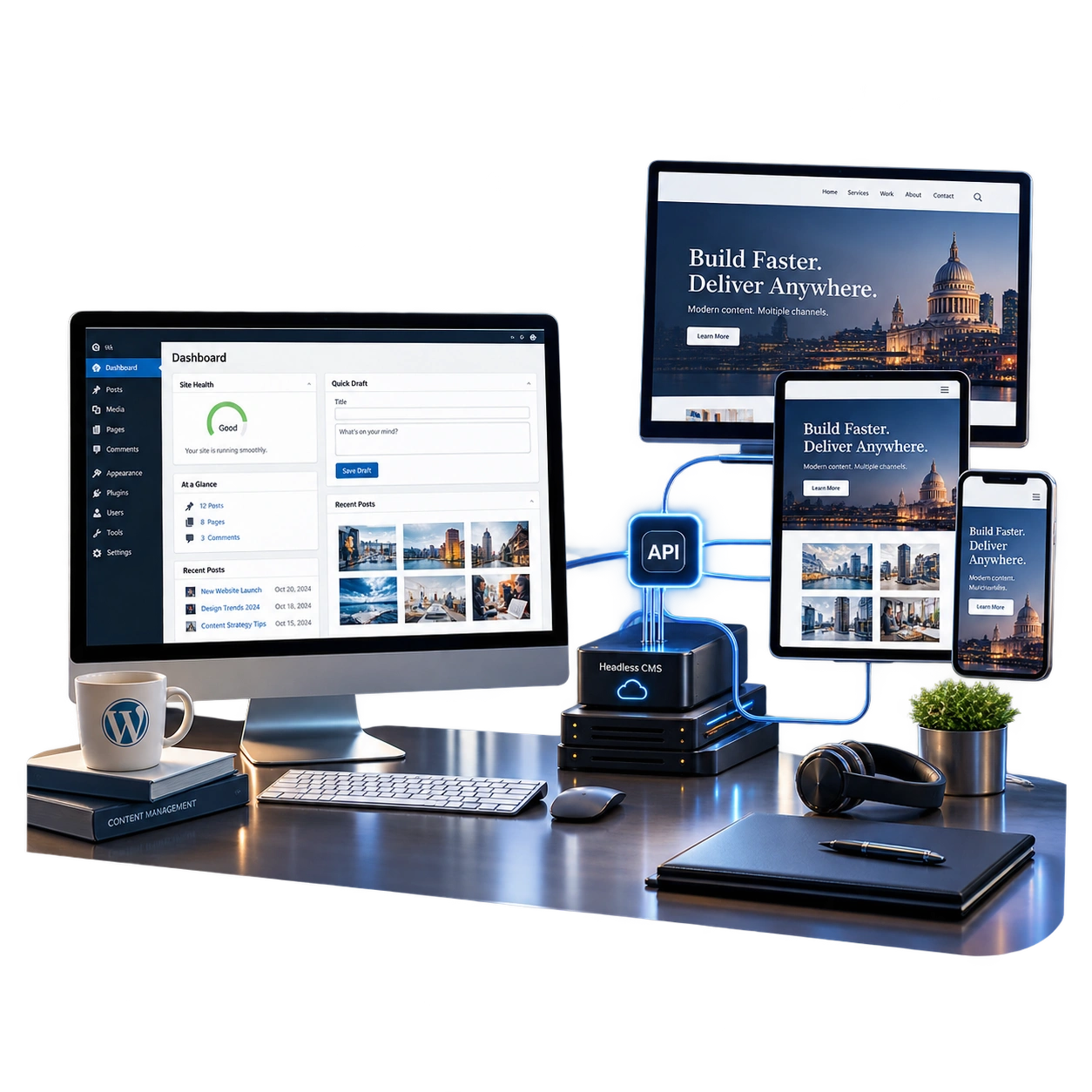
A headless CMS stores and manages content without controlling how it is displayed. Content is delivered through an API to a separately built website, mobile app, in-store screen or any other channel.
For example, a retailer could manage product descriptions, articles and store locations in one system, then publish that content to its website, app and digital signage at once. The front end might be built with a framework such as Next.js, while content sits in Contentful, Sanity, Strapi or even WordPress itself.
Headless CMS development is rarely a plug-and-play job. It sits firmly within custom web development services, because the team must design the content model, build the front end, connect the API, set up previews and configure deployment. Done well, it gives you more control over performance, design and multi-channel delivery. Done without proper planning, it adds moving parts you did not need.

WordPress vs Headless CMS: Which Is Easier for Content Teams?
WordPress is usually easier on day one. Editors can see pages, update text, add images and preview changes in one place, and the block editor gives marketing teams real control without needing a developer for every tweak.
A headless CMS can offer an excellent editing experience too, but only if it is designed around real workflows. Editors may need live previews, reusable content blocks, approval stages and clear controls over where content appears. Treat those as afterthoughts and your team ends up with a technically impressive system that is frustrating to use.
Before choosing, ask the people who publish content to walk you through their weekly tasks. The platform should support those tasks, not force the team to work around the technology.
Headless CMS vs WordPress for Website Speed and Core Web Vitals
A headless website can be extremely fast because developers control exactly how pages are rendered, cached and delivered. Static generation, edge hosting and lightweight front-end code reduce the work needed every time a visitor opens a page.
That does not make WordPress slow by default. A well-built WordPress site with quality hosting, optimised images, limited plugins and clean code can pass Core Web Vitals comfortably. Most slow WordPress sites suffer from bloated themes, unnecessary scripts or cheap hosting, not the CMS itself.
Judge performance with real user data, not platform marketing. Whichever route you take, monitor Largest Contentful Paint, Interaction to Next Paint and Cumulative Layout Shift across your key pages and devices.
WordPress vs Headless CMS for SEO: Which Ranks Better?
Both can rank at the top of Google. Search engines reward accessible content, genuinely useful information, crawlable links, logical page structure, mobile performance and a technically sound build, whatever the platform.
WordPress has mature SEO tools for titles, meta descriptions, XML sitemaps, canonical tags, redirects and schema markup, which makes routine SEO work easy for marketing teams.
A headless front end gives developers fine control over rendering and speed, but SEO must be planned from day one. JavaScript-driven sites still need server-side or static rendering, discoverable links, indexable content, correct status codes and reliable metadata. Preview environments, pagination, faceted navigation and redirects also need careful handling.
Headless CMS development is not an SEO shortcut. It supports excellent SEO only when the architecture and publishing process are built with search in mind.
Headless Commerce vs WooCommerce: Advice from an Ecommerce Website Development Company
WordPress with WooCommerce suits small and medium-sized retailers that want a manageable store, flexible content and a wide choice of extensions. A specialist ecommerce website development company can tailor checkout, product templates, integrations and reporting around how you actually operate.
Headless commerce makes sense when a retailer needs several storefronts, very fast category pages, complex product experiences or content shared across web and mobile apps. It also supports a composable setup where search, checkout, content and product data come from separate best-in-class services.
That flexibility brings responsibility. Stock, pricing, promotions, VAT, payments and customer accounts must stay reliable across every connected system. Base the decision on operational complexity, not just visual ambition.
Security and Maintenance: Headless CMS vs WordPress
WordPress needs regular updates to its core, themes and plugins. A disciplined maintenance plan, secure hosting, limited admin access and carefully chosen extensions reduce the risk considerably.
A headless setup reduces direct public exposure of the content system, but it is not automatically secure. It may involve a CMS, a front-end framework, hosting, APIs, third-party services and build pipelines, and every one of them needs monitoring and updates.
Ask who will own maintenance after launch. A system that depends on several specialists can cost more to support than a well-managed WordPress site.
Cost and Time to Launch: WordPress vs Headless CMS in the UK
WordPress is usually quicker and cheaper for a conventional marketing website, because publishing and admin features already exist out of the box.
Headless CMS development typically needs more discovery, front-end development, API work, preview tooling, deployment setup and testing. That higher upfront cost pays off when the architecture supports multiple channels or business-critical product requirements.
Compare the total cost over three to five years, including hosting, licences, maintenance, upgrades, content operations and future development. The cheapest launch is not always the lowest-cost choice, but any extra complexity should deliver a clear return.
When to Choose WordPress vs Headless CMS: A Practical Decision Guide
Choose WordPress when:
- Your main need is a marketing, content or service website
- Editors want straightforward control over pages and campaigns
- You want to launch quickly and keep costs predictable
- Standard integrations cover most of your requirements
- A single website is your main publishing channel
Choose headless CMS development when:
- Content must be reused across websites, apps or other channels
- Your front end behaves more like a digital product than a brochure site
- Performance or design requirements justify a custom architecture
- Several teams, markets or brands share structured content
- You have the budget and technical support to maintain it
The hybrid option: headless WordPress
You do not always have to pick one. WordPress can act as a headless CMS through its REST API or GraphQL, so editors keep the familiar dashboard while developers build a modern, high-speed front end. You can also move selected sections of a site to a headless front end while the rest stays on traditional WordPress.
Choosing a WordPress Agency UK Businesses Can Trust: 7 Questions to Ask
Do not start with “Which platform is best?” Start with these questions:
- Who will publish and approve content?
- How many websites, apps or channels need the same information?
- Which integrations are genuinely business-critical?
- What must the website do in two or three years?
- Who will maintain the platform after launch?
- What level of speed, personalisation or app-like behaviour do you need?
- What is the realistic total budget, including ongoing support?
A good WordPress agency UK businesses rely on should recommend headless when it is justified. Equally, a headless specialist should tell you when a conventional CMS will do the job more simply.
Final Verdict: Headless CMS vs WordPress
WordPress is often the sensible choice for businesses that need a flexible, manageable and cost-effective website. Headless CMS development becomes valuable when content must serve several channels, the front end has complex requirements or your organisation needs a more composable digital platform.
The best architecture is the one that supports your users, your editors and your business goals without adding unnecessary complexity. EMPWR3D is a London-based WordPress development agency and ecommerce website development company offering WordPress, ecommerce and headless custom web development services to businesses across the UK and beyond. Book a free discovery call and we will compare the options against your real requirements, not the latest trend.
Frequently Asked Questions
Q1. Is a headless CMS better than WordPress?
Not automatically. WordPress is often ideal for content and marketing websites, while a headless CMS is better for custom front ends, multiple channels and complex digital experiences.
Q2. What is headless CMS development?
Headless CMS development is the process of building a website or app where content is managed in a CMS and delivered through APIs to a separately built front end. It allows the same content to be published across websites, apps and other channels.
Q3. Is a headless CMS faster than WordPress?
It can be, but it depends on the build. Front-end code, hosting, caching, image optimisation and content delivery all affect speed, and a well-optimised WordPress site can also be very fast.
Q4. WordPress vs headless CMS: which is better for SEO?
Neither wins by default. Both rank well when they have crawlable content, accurate metadata, internal links, structured data, fast performance and a technically sound SEO setup.
Q5. Can WordPress be used as a headless CMS?
Yes. WordPress’s REST API or GraphQL can deliver content to a separately built front end, while your team keeps managing content in the familiar WordPress dashboard.