
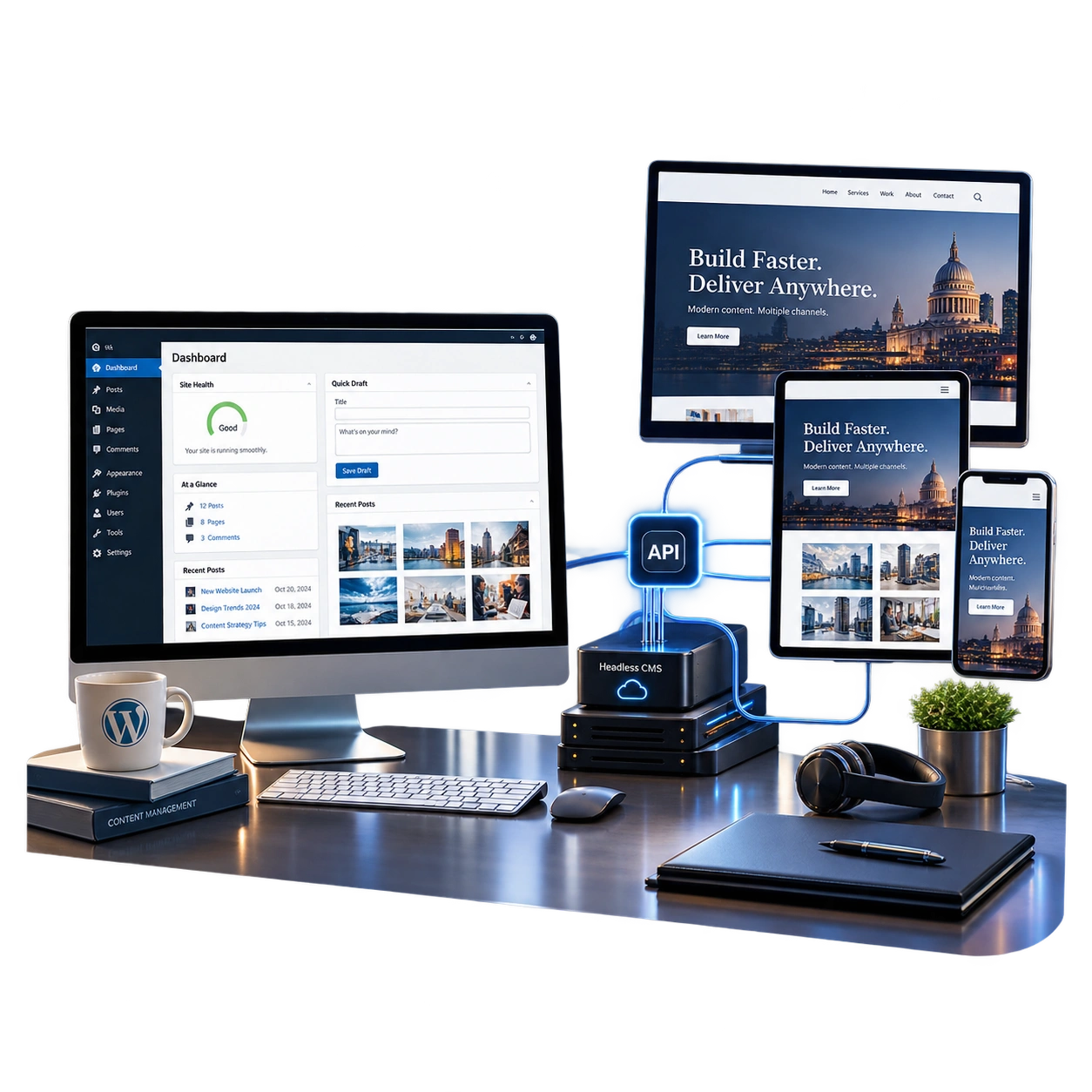
Choosing a content management system can feel like a technical decision, but it quickly affects everyday business life. It determines how easily your team can update pages, how quickly new features can be added, how much maintenance is required and whether the website can keep pace with growth.
WordPress remains a practical choice for many organisations because it combines content editing, themes, plugins and website management in one familiar system. A headless CMS separates the content platform from the website visitors see, giving developers more freedom over the front end. Neither approach is automatically more modern, more secure or better for SEO.
A small professional services firm and a retailer operating across several markets may both need a new website, but they should not be pushed towards the same architecture.
What is WordPress?
WordPress is a content management system that can manage both the back end and the front end of a website. Editors create pages and posts in the administration area, while themes and templates control how that content appears to visitors.
Businesses can publish content, add forms, manage products, create landing pages and extend functionality through a large plugin ecosystem. A capable WordPress development agency can also build custom themes and features rather than relying on a generic template.
WordPress is often a strong fit for marketing websites, service businesses, editorial sites, membership platforms and many ecommerce projects. It can be simple or highly customised, depending on the quality of the build.
What is a headless CMS?
A headless CMS stores and manages content without controlling the final presentation layer. Content is delivered through an API to a separately built website, app, digital display or another channel.
For example, a business could manage product descriptions, articles and location information in one system, then publish that content to its website, mobile app and in-store screens. The front end might be built with a framework such as Next.js, while the content sits in WordPress, Contentful, Sanity or another platform.
Headless CMS development gives teams more control over performance, design and multi-channel delivery. It also introduces more moving parts, which means stronger technical planning is essential.
Which option is easier for content teams?
WordPress is usually easier to understand at the start. Editors can see pages, update text, add images and preview changes within one platform. Tools such as the block editor can give marketing teams considerable control without requiring a developer for every update.
A headless CMS can also provide an excellent editorial experience, but it needs to be designed around real workflows. Editors may need live previews, reusable content blocks, approval stages and clear controls over where content appears. If these are treated as afterthoughts, the content team can end up with a technically impressive system that is frustrating to use.
Before choosing, ask the people who will publish content to demonstrate their weekly tasks. A platform decision should support those tasks rather than forcing the team to work around the technology.
Which is better for website speed?
A headless website can be extremely fast because developers can control how pages are rendered, cached and delivered. Static generation and modern hosting can reduce the amount of work needed when a visitor opens a page.
That does not mean WordPress is slow by definition. A well-built WordPress site with sensible hosting, optimised images, limited plugins and clean code can perform very well. Many slow WordPress sites are the result of poor themes, unnecessary scripts or weak hosting, not the CMS itself.
Performance should be judged through real user data, not platform marketing. Whichever route you choose, the team should monitor loading speed, responsiveness and layout stability across important pages and devices.
Which is better for SEO?
Both can rank well. Search engines care about accessible content, useful information, crawlable links, sensible page structure, mobile performance and a technically sound implementation.
WordPress provides mature tools for titles, descriptions, sitemaps, canonical tags, redirects and schema. This can make routine SEO work easier for marketing teams.
A headless front end can give developers fine control over rendering and performance, but SEO requirements must be planned from the beginning. JavaScript-powered sites still need discoverable links, indexable content, correct status codes and reliable metadata. Preview environments, pagination, faceted navigation and redirects also need careful handling.
Headless CMS development is not an SEO shortcut. It can support excellent SEO when the architecture and publishing process are built correctly.
What about ecommerce?
WordPress with WooCommerce can suit small and medium-sized retailers that need a manageable store, flexible content and a broad choice of extensions. A specialist ecommerce website development company can customise checkout, product templates, integrations and reporting around the operation.
Headless commerce may make sense when a retailer needs several storefronts, unusually fast category pages, complex product experiences or content shared across web and mobile channels. It can also support a composable approach where search, checkout, content and product information come from separate services.
That flexibility creates responsibility. Stock, pricing, promotions, tax, payments and customer accounts must stay reliable across the system. The decision should be based on operational complexity, not only visual ambition.
Security and maintenance
WordPress requires regular updates to the core platform, themes and plugins. A disciplined maintenance process, secure hosting, limited administrator access and carefully selected extensions reduce risk considerably.
A headless setup can reduce direct exposure of the content system, but it is not automatically secure. It may involve a CMS, front-end framework, hosting platform, APIs, third-party services and build pipelines. Every component needs monitoring and updates.
Ask who will own maintenance after launch. A system that depends on several specialists may cost more to support than a well-managed WordPress site.
Cost and time to launch
WordPress is usually faster and less expensive for a conventional marketing website because common publishing and administration features already exist.
Headless projects often need more discovery, front-end development, API work, preview tooling, deployment configuration and testing. The higher initial cost can be worthwhile when the architecture supports multiple channels or important product requirements.
Compare total cost over several years, including hosting, licences, maintenance, upgrades, content operations and future development. The cheapest launch is not always the lowest-cost choice, but additional complexity should have a clear return.
A practical decision guide
Choose WordPress when:
- The main requirement is a marketing, content or service website.
- Editors need straightforward control over pages and campaigns.
- The business wants to launch efficiently and manage costs.
- Standard integrations can meet most requirements.
- A single website is the main publishing channel.
Consider a headless CMS when:
- Content must be reused across websites, apps or other channels.
- The front end behaves more like a digital product than a standard website.
- Performance or design requirements justify a custom architecture.
- Several teams, markets or brands share structured content.
- The business has the budget and technical support to maintain the system.
A hybrid approach is also possible. WordPress can act as a headless CMS, or selected parts of a site can use modern front-end technology while editors retain familiar publishing tools.
Questions to ask before choosing
Do not begin with, “Which platform is best?” Begin with these questions:
- Who will publish and approve content?
- How many websites, apps or channels need the same information?
- Which integrations are genuinely business-critical?
- What must the website do in two or three years?
- Who will maintain the platform after launch?
- What level of speed, personalisation or application behaviour is required?
- What is the realistic total budget, including ongoing support?
A good WordPress agency UK businesses work with should be willing to recommend headless when it is justified. Equally, a headless specialist should be honest when a conventional CMS will do the job more simply.
Final takeaway
WordPress is often the sensible choice for businesses that need a flexible, manageable and cost-effective website. Headless CMS development becomes valuable when content must serve several channels, the front end has complex requirements or the organisation needs a more composable digital platform.
The best architecture is the one that supports users, editors and business goals without adding unnecessary complexity. EMPWR3D provides WordPress, ecommerce and headless custom web development services for UK businesses. Speak to the team to compare the options around your actual requirements rather than choosing a platform based on fashion.
Frequently Asked Questions
1. Is a headless CMS better than WordPress?
A headless CMS is not automatically better than WordPress. WordPress is often ideal for content and marketing websites, while a headless CMS is useful for custom front ends, multiple channels, and complex digital experiences.
2. What is a headless CMS?
A headless CMS manages content separately from the website’s front end. It delivers content through APIs, allowing businesses to publish the same content across websites, apps, and other digital channels.
3. Is a headless CMS faster than WordPress?
A headless CMS can be faster, but it depends on implementation. Front-end code, hosting, caching, image optimization, and content delivery all affect website performance.
4. Is headless CMS better for SEO?
Not automatically. Both WordPress and headless CMS websites can rank well when they have crawlable content, proper metadata, internal links, structured data, fast performance, and technically sound SEO.
5. Can WordPress be used as a headless CMS?
Yes. WordPress can function as a headless CMS. Its REST API can deliver content to a separately developed front end while teams continue managing content through WordPress.